

Improving your website’s Google ranking isn’t about tweaking a few keywords or publishing more content—it’s about understanding why your site isn’t performing in the first place. Most websites struggle in search due to a combination of technical issues, weak or unfocused content, poor structure, and a lack of authoritative signals. Until those problems are addressed together, rankings tend to stall.
To improve your website’s Google ranking, you need a clear, structured approach that aligns with how search engines evaluate websites today. Google is looking for sites that are fast, well-organized, highly relevant to search intent, and backed by credible signals like strong backlinks and user engagement.
At Accent Graphix Design Studio, we’ve helped businesses move from being virtually invisible online to consistently ranking on page one by focusing on these exact areas. Below is a step-by-step guide to improving your website’s Google ranking using strategies that actually work.
How to Improve Your Website’s Google Ranking
Step 1: Run a Website and SEO Audit to evaluate your site’s Google Ranking
Before making any changes, you need a clear understanding of what’s currently holding your website back. Most ranking issues aren’t caused by one single problem—they’re the result of multiple small issues compounding over time. A comprehensive website and SEO audit (I use SEMrush) allows you to identify exactly where those breakdowns occur, so you can address them strategically rather than guessing.
Start by evaluating both the technical performance of your site and the quality of your content. Look for issues that could be limiting visibility, usability, or search engine trust. This step sets the foundation for everything that follows—without it, you risk fixing the wrong problems or missing key opportunities altogether.
- Identify broken links, missing pages, and crawl errors
- Check page speed and Core Web Vitals performance with Google Pagespeed Insights
- Review meta titles and descriptions for duplication or gaps
- Analyze current keyword rankings and search visibility
- Evaluate content quality and alignment with search intent
Step 2: Fix Technical SEO Issues
Technical SEO is the foundation of your website’s ability to rank. Even the best content won’t perform well if search engines can’t properly crawl, index, or interpret your site. Many websites struggle with hidden technical issues that quietly limit visibility—things like slow load times, poor mobile performance, or pages that aren’t being indexed correctly.
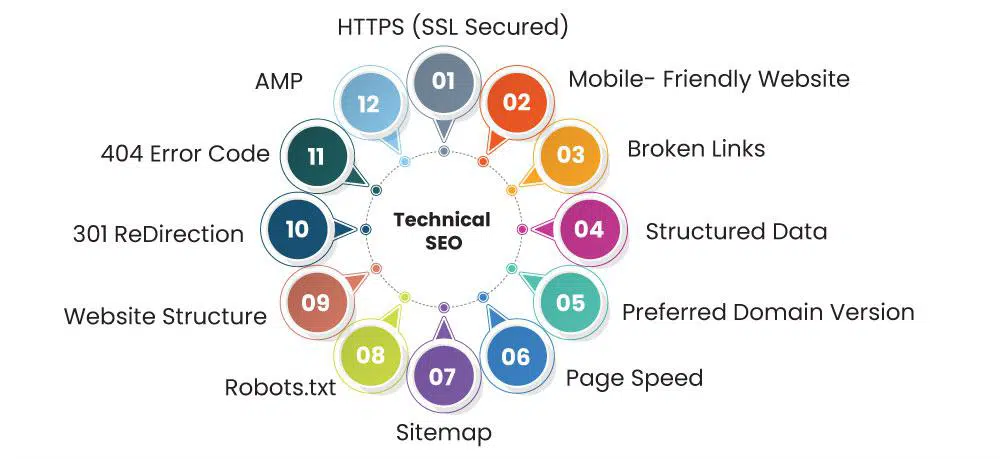
Addressing these issues is one of the fastest ways to improve your website’s Google ranking, as it removes barriers that prevent search engines from fully understanding and trusting your site. This step ensures your website is not only accessible but also structured to support long-term growth in search results.
- Improve page speed and Core Web Vitals to enhance both performance and user experience
- Ensure your site is fully mobile-friendly and responsive across all devices
- Fix crawl errors, broken pages, and indexing issues in Google Search Console
- Optimize your site structure and navigation so pages are easy to find and understand
- Eliminate duplicate content and incorrect redirects that confuse search engines
Step 3: Optimize Your Content for Google Ranking & Search Intent
One of the most common reasons websites struggle to rank is that their content doesn’t align with what people are actually searching for. It’s not enough to include keywords—you need to understand the intent behind those searches and create content that directly satisfies it. If your page doesn’t clearly answer the user’s question or solve their problem, Google is far less likely to prioritize it in search results.
Optimizing for search intent means structuring your content so it’s easy to read, easy to understand, and immediately useful. Your headings, layout, and messaging should guide users to the information they’re looking for without making them dig for it. When your content aligns with both the search query and user expectations, it becomes much easier for Google to recognize its relevance and value.
- Use clear, keyword-focused page titles and headings that reflect what users are searching for
- Write content that directly answers common questions in a straightforward, helpful way
- Avoid keyword stuffing—focus on clarity, readability, and natural language
- Expand thin content so pages provide real value, not just surface-level information
- Update outdated pages with fresh, relevant content that reflects current search trends
Step 4: Add Structured Content (FAQs and How-To Sections)
Search engines like Google rely on structured content to better understand what your pages are about and how they should be presented in search results. When your content is clearly organized into sections such as FAQs or step-by-step guides, it becomes easier for Google to interpret, index, and display it as enhanced or rich results. This can improve visibility, increase click-through rates, and make your listing stand out in search.
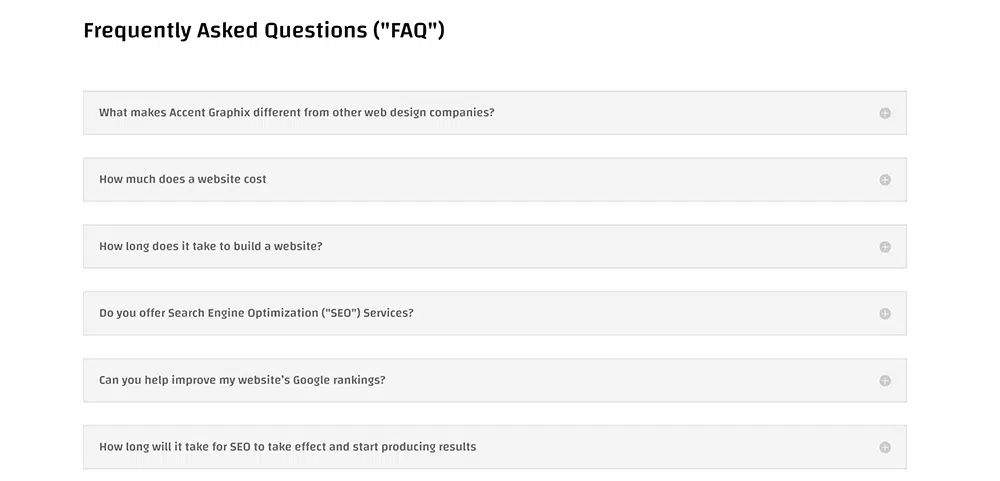
Structured content also improves the overall user experience by making information easier to scan and navigate. Visitors can quickly find answers without digging through large blocks of text, which increases engagement and helps search engines recognize your content as useful and relevant.
In addition to on-page formatting, implementing schema markup (structured data) reinforces how your content is understood. FAQ and HowTo schema help search engines clearly identify questions, answers, and step-by-step processes, increasing the likelihood of rich results. This same structured approach is also used by AI platforms like ChatGPT, Perplexity, and Google’s AI-generated results, which pull from well-organized content to deliver clear, direct answers to users.
- Add FAQ sections to key pages to answer common questions clearly and directly
- Use consistent headings and step-by-step formats to organize content logically
- Implement schema markup (FAQ and HowTo) to support rich results and improved indexing
- Ensure your structured data matches the visible content on the page
- Organize content so users can quickly scan and find answers without confusion
Step 5: Build High-Quality Backlinks
Backlinks are among the strongest signals Google uses to determine your website’s credibility and authority. When other reputable websites link to yours, it acts as a vote of confidence—telling search engines that your content is trustworthy and worth ranking. However, not all backlinks are beneficial. Low-quality or spammy links can harm your rankings, so focusing on quality over quantity is critical.
Building a strong backlink profile requires a strategic approach. Instead of chasing random links, the goal is to earn placements from relevant, authoritative sources—especially those connected to your industry or local market. At the same time, it’s important to monitor and clean up harmful backlinks that may be working against you.
- Earn links from reputable, relevant websites within your industry or service area
- Partner with local organizations such as Chambers of Commerce, business associations, and community groups
- Build relationships with complementary local businesses (real estate agents, contractors, interior designers, property managers) for cross-promotion and referrals
- Get listed in high-quality directories and local business listings with consistent information
- Create valuable content (guides, case studies, before-and-after projects) that others naturally want to link to
- Regularly audit your backlink profile to identify and remove or disavow toxic or spammy links
Step 6: Strengthen Internal Linking
Internal linking plays a critical role in how search engines understand and rank your website. It helps establish the relationships between your pages, shows which content is most important, and distributes authority throughout your site. Without a clear internal linking structure, even strong pages can struggle to perform because search engines don’t have enough context to properly evaluate them.
A well-planned internal linking strategy also improves the user experience by guiding visitors to relevant content, keeping them engaged longer, and helping them find exactly what they’re looking for. When done correctly, it creates a natural flow through your website—leading users from general information to more specific services or conversion points.
Rather than adding links randomly, internal linking should be intentional. Key pages—such as your primary services—should be supported by related content like blog posts, FAQs, and location pages. This reinforces topical relevance and strengthens your overall site structure in the eyes of search engines.
- Link related pages together naturally within your content to create clear topic relationships
- Connect blog posts to relevant service pages to support keyword relevance and conversions
- Use descriptive anchor text that clearly indicates what the linked page is about
- Prioritize linking to high-value pages you want to rank (not just random content)
- Avoid orphan pages by ensuring every important page is connected within your site structure
- Create a logical navigation flow that helps both users and search engines move through your site easily
Step 7: Improve User Experience
Google doesn’t just evaluate what’s on your website—it evaluates how users interact with it. If visitors land on your site and quickly leave, struggle to find information, or have a frustrating experience, those signals can negatively impact your rankings. A well-designed website keeps users engaged, encourages them to explore, and makes it easy to take the next step.

User experience goes beyond visual design. It includes how your site is structured, how quickly it loads, how easily users can navigate between pages, and how clearly information is presented. When your website is intuitive and easy to use, visitors stay longer, view more pages, and are more likely to convert—all of which send positive signals to search engines.
Improving user experience means removing friction. Every element of your site should guide visitors toward what they’re looking for without confusion or unnecessary steps. The easier it is to use your site, the stronger your overall performance will be in both search rankings and lead generation.
- Make your site easy to navigate with clear menus and logical page structure
- Use clean, modern design that builds trust and reflects your brand professionally
- Ensure fast load times across all devices to prevent users from leaving early
- Keep important information (services, pricing, contact details) easy to find
- Use clear calls-to-action so users know what to do next
- Design with mobile users in mind, ensuring a seamless experience on smaller screens
Step 8: Monitor Performance and Adjust
SEO is not a one-time task—it’s an ongoing process that requires consistent monitoring, evaluation, and refinement. Search rankings are constantly shifting based on competition, algorithm updates, and changes in user behavior. What works today may not perform the same way a few months from now, which is why tracking performance is essential to maintaining and improving your visibility over time.
Monitoring your website’s performance allows you to move beyond guesswork and make informed decisions based on real data. Instead of assuming what’s working, you can clearly see which pages are gaining traction, which keywords are improving, and where opportunities still exist. This insight allows you to double down on successful strategies while adjusting or improving areas that are underperforming.
A strong SEO strategy is built on continuous improvement. By regularly reviewing performance metrics and making targeted updates—whether that’s refining content, strengthening internal links, improving technical health, or expanding keyword coverage—you create momentum that leads to long-term growth in rankings and traffic.
- Use tools like Google Search Console and SEMrush to monitor search performance and site health
- Track keyword rankings and identify trends over time—not just one-time positions
- Analyze which pages are driving traffic and which need improvement or expansion
- Monitor backlinks to ensure quality and identify new opportunities for growth
- Regularly check for technical issues that may impact performance or indexing
- Continuously refine your strategy based on data, not assumptions
Final Thoughts
Improving your website’s Google ranking isn’t about quick fixes—it’s about implementing the right strategy and refining it over time. When all of the pieces are working together—technical performance, structured content, internal linking, and authority signals—you create a website that not only ranks, but continues to grow stronger over time.
At Accent Graphix Design Studio, we’ve helped businesses move from low visibility to consistent page-one rankings by focusing on what actually drives results. If you’re curious what this looks like in action, you can see how we increased traffic by 200% at Vida Aesthetics and how we increased new client growth and enrollment at Madison Pro Dance. These examples break down the exact strategies we used to improve rankings, increase visibility, and drive new client growth.
If you’re unsure where your website stands—or you know it’s not performing the way it should—we can help you identify exactly what’s holding it back and build a clear path forward. SEO isn’t guesswork when it’s done right—it’s a system, and we know how to make it work.