
One of my long-time clients recently came to me with a challenge: they needed a secure way for customers to complete and submit credit applications online.
Because credit applications can contain sensitive business and financial information, this project required much more than simply putting a form on a website. The goal was to make the process easy for customers while building multiple layers of security and data protection behind the scenes.
To protect our client’s privacy and security, we’ve intentionally left the company’s name and credit application portal address out of this case study. We’re proud to share the solution we developed, but protecting our client’s information—and the systems we build for them—always comes first.
The Challenge: Taking a Sensitive Application Process Online
The application needed to collect sensitive information (banking information, Social Security numbers) while giving authorized staff a secure way to access it. That information also needed to be protected while stored online and automatically removed when it was no longer needed. A standard WordPress form simply wasn’t secure enough for this project.
Security had to be considered at every stage—from who could access the website and submit the application to how the information was stored, who could view it and how long it remained online.
The Solution: A Custom Secure Credit Application Portal
Accent Graphix developed a dedicated WordPress credit application portal using Gravity Forms (the best forms solution out there, if you ask me) as the foundation, along with additional security tools and custom configurations designed around the client’s specific workflow.
For customers, the process is intentionally simple: access the website, complete the application, and submit it securely. Behind that simple experience, however, are multiple layers of protection provided through Gravity Forms, Cloudflare Turnstile(which integrates seamlessly with Gravity Forms), Wordfence, and Kinsta (Secure, Fast, Managed WordPress Hosting), along with encryption (built into Gravity Forms), dual verification (2FA) for administrative access, and automatic data deletion.
Password-Protected Website Access
The entire credit application website is password-protected and isn’t accessible to the general public. Customers must have the correct password to access any part of the site, creating the first layer of protection before they reach the application.
A Custom Application Built With Gravity Forms
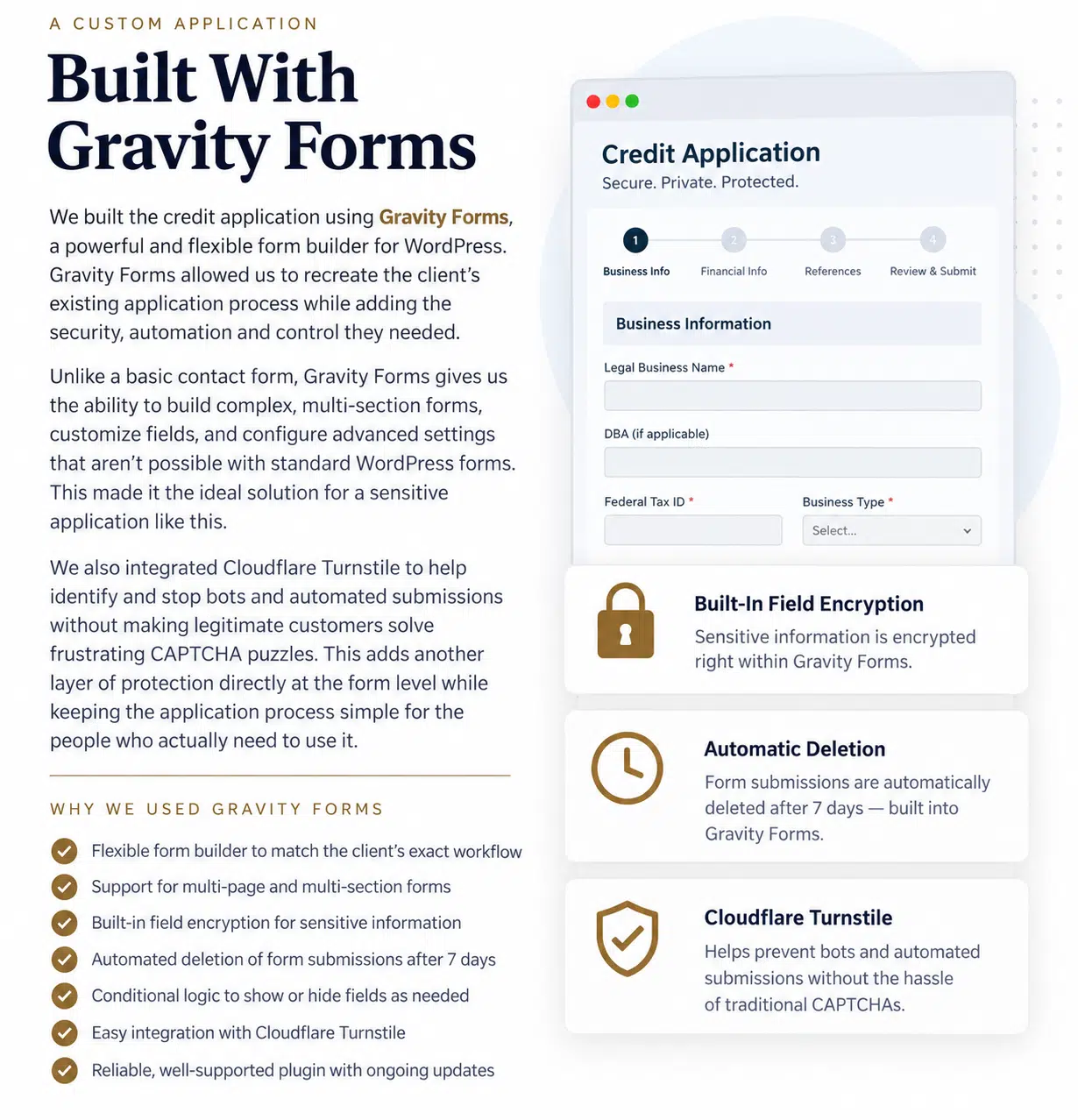
We built the credit application using Gravity Forms, which gave us the flexibility to recreate the client’s existing application while adding the security, automation, and control this project required. Rather than simply collecting information and emailing it, Gravity Forms let us build a structured application with multiple sections, customized fields, and a workflow designed around how the client receives and processes applications.
We also configured encryption for sensitive fields, so personal and financial information is protected while it’s stored in the website database. We configured Gravity Forms’ entry-retention settings to automatically delete submitted applications after seven days, eliminating the need to manually remove old entries and ensuring sensitive information doesn’t remain on the live website longer than necessary.
Finally, we integrated Cloudflare Turnstile with Gravity Forms to help identify and stop bots and automated submissions without requiring legitimate customers to solve traditional CAPTCHA puzzles. Together, these features allowed us to create an application that’s easy for customers to use while giving us much greater control over how sensitive information is collected, protected and retained.
Encrypted Application Data
Protecting the information after someone clicks Submit was one of the most important parts of this project. Sensitive personal and financial fields collected through Gravity Forms are encrypted while stored in the website database, so the underlying information itself has an additional layer of protection.
Restricted Access to Application Information
We also needed to tightly control who could view submitted applications. The system is configured so that only authorized administrators can access and decrypt the protected information, keeping sensitive data limited to the people who actually need it.
When a new credit application is submitted, the client receives an email notification that an application is ready for review, but all sensitive or protected information is hidden (encrypted) and does not appear in the email. Instead, authorized staff must securely log in to the portal to view and decrypt the application, ensuring protected data is never transmitted through email.
Two-Factor Authentication With Wordfence
Wordfence two-factor authentication (2FA) protects administrator access. A username and password alone aren’t enough to access the administrative area. Authorized administrators must also enter a time-sensitive authentication code generated on a separate device.
That means even if an administrator’s password were compromised, the password alone wouldn’t provide access to the site’s protected administrative area.
Wordfence Web Application Firewall
We also configured the Wordfence Web Application Firewall to work alongside Kinsta’s hosting-level security, adding another layer of WordPress-specific protection. While Kinsta helps filter malicious traffic before it reaches the website, Wordfence provides additional protection within WordPress itself, identifying and blocking suspicious requests, common attacks and other potentially malicious activity.
Wordfence also provides brute-force login protection, helping defend the site against repeated password-guessing attempts.
Kinsta Hosting-Level Security
The portal is hosted with Kinsta, adding another layer of protection before malicious traffic reaches WordPress. Kinsta provides managed hosting security and malicious-traffic protection at the hosting level, working alongside Wordfence rather than relying on WordPress alone to protect the site.
This was an important part of our approach: security doesn’t start at the form or even at the WordPress login screen.
Blocking Traffic Outside the United States
Because our client serves customers exclusively within the United States, the credit application portal had no reason to accept traffic from around the world.
Using Kinsta’s traffic controls, access from outside the United States is blocked at the hosting level. This significantly reduces unnecessary exposure to international bots, spam and malicious traffic before those requests ever need to be handled by WordPress.
Country blocking isn’t a replacement for a firewall, encryption or secure login practices. In this case, it’s simply another layer of protection tailored to how the business actually operates.
Automatic Deletion of Sensitive Information
Another important part of the security plan was making sure sensitive application data didn’t remain on the website any longer than necessary. Our client needs enough time to retrieve and process an application, but there’s no reason for sensitive credit application information to remain in the live website database indefinitely. Submitted applications are therefore automatically deleted from the live website after seven days, minimizing the amount of sensitive information stored online at any given time.
The Result: Multiple Layers of Security
No single plugin or security setting could accomplish everything this project required. Instead, we built the portal using multiple layers of protection that work together:
Kinsta Secure Managed Hosting → U.S.-Only Access → Wordfence Web Application Firewall → Password-Protected Website → Cloudflare Turnstile → Gravity Forms → Encrypted Data → Restricted Administrator Access → Two-Factor Authentication → Automatic Data Deletion
By the time we were finished, we joked that the site was “locked down like the Pentagon.”
Of course, no website can ever be considered completely immune to security threats. But that’s exactly why we took a layered approach. This application’s security doesn’t depend on one password, one plugin, or one firewall. Every layer serves a different purpose, and together they create a much stronger system for protecting the website and the sensitive information submitted through it.
Could Your Business Benefit From a Secure Online Application?
This project started with a credit application, but the same type of secure online system can be adapted to many business needs. Credit applications, vendor applications, client intake forms, account applications, membership applications, and internal business forms can all be built around the information your organization needs to collect and protect.
If your business is currently emailing sensitive PDFs back and forth, collecting confidential information through a basic website form or storing form submissions online indefinitely, there may be a better and more secure way to do it.
Secure Online Forms Built for Your Business
Accent Graphix Design Studio develops custom WordPress forms and secure online application portals designed around your business, your workflow, and the type of information you need to collect.
Have a complicated form or application process you’re not sure can be moved online? Let’s talk about it.